EN DE
Dyno Testing App

Professional
Dyno Testing
In Your Pocket

Transform your smartphone into a precision dynamometer. Audio frequency analysis for real-time power and torque curves. Built for Vespa, works with all engines.

44.1 kHz
Sample Rate
16k
FFT Window
±50
RPM Accuracy
0.1s
Resolution
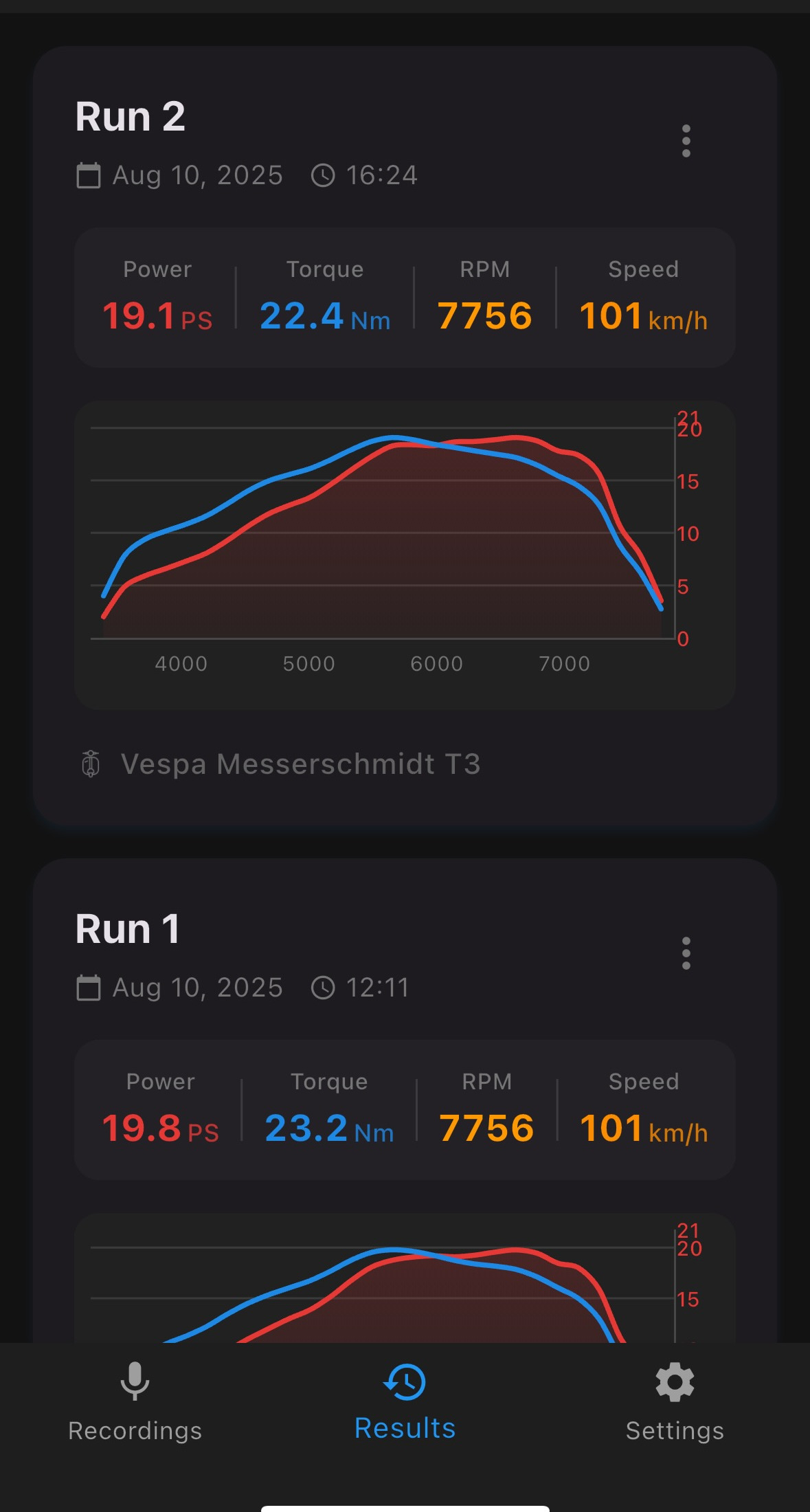
Microdyno Results Screen
Live Results

Advanced Dyno Technology

Professional-grade measurements using cutting-edge audio analysis

FFT

Audio Frequency Analysis

Advanced FFT algorithms analyze engine sound to determine RPM with precision accuracy, detecting fundamental frequencies and harmonics.

Graph

Real-Time Graphs

Watch power and torque curves develop in real-time. Export data for further analysis or comparison with other runs.

Hz

Harmonic Editing

Advanced spectrogram editor allows you to remove noise and unwanted frequencies for cleaner, more accurate measurements.

Ratio

Custom Gear Ratios

Configure your exact setup with custom gear ratios, tire sizes, and vehicle specifications for accurate power calculations.

GPS

GPS Integration

Optional GPS tracking provides real-world speed validation and altitude compensation for the most accurate results.

Log

Run History

Save and compare unlimited dyno runs. Track your modifications and see performance improvements over time.

How to Use Microdyno

Get accurate dyno results in minutes

01

Setup Your Vehicle

Configure your Vespa's specifications in the app. Enter your gear ratio, tire size, and vehicle weight for accurate calculations.

Gear Ratio: Total ratio from engine to wheel Example: Primary (2.86) × Secondary (4.2) = 12.01
02

Position Your Phone

Place your phone securely in a backpack during the ride. This positioning protects the microphone from wind interference while clearly capturing engine sound.

The backpack placement ensures safety and optimal recording quality without vibrations affecting the measurement.

03

Perform the Test

Start recording, then accelerate from low RPM to redline in 3rd gear. Maintain full throttle throughout the pull for accurate measurements.

Safety: Always perform tests in a safe, controlled environment ✓ Use 3rd gear for optimal results ✓ Warm up engine before testing ✓ Phone safely stored in backpack
04

Trim to 3rd Gear Run

Trim your recording to isolate only the 3rd gear acceleration run. This ensures accurate analysis by removing idle time and gear changes.

05

Edit Harmonics

Use the spectrogram editor to clean up your recording. Remove any noise, vibrations, or interference by tapping on unwanted frequencies in the visual display.

This crucial step ensures accurate measurements. The app tracks the fundamental frequency, and you fine-tune it by removing artifacts for precise power calculations.

06

Analyze Results

View your power and torque curves instantly. The app calculates peak values, shows the full RPM range, and allows you to save runs for comparison.

Export data as images or raw values for further analysis or sharing with your tuning community.

Specifications

Professional-grade accuracy backed by advanced signal processing

0
kHz Sample Rate
0
FFT Window Size
0
RPM Accuracy
0
Time Resolution

Support & FAQ

Get help with Microdyno and find answers to common questions

How Do I Use Microdyno?

Place your phone in a backpack, start recording, then perform a full-throttle acceleration in 3rd gear from low RPM to redline. The app analyzes the engine sound to calculate power and torque.

Why Microphone Permission?

Microdyno analyzes engine sounds using FFT algorithms to determine RPM precisely. The microphone captures the audio frequencies needed for accurate power calculations.

Is Location Required?

No, location is optional. It's used to fetch weather data (temperature, pressure, humidity) for more accurate measurements, but you can use the app without it.

Only Vespa?

While optimized for Vespa scooters, Microdyno works with any engine. Configure custom gear ratios and specifications for motorcycles, cars, or other vehicles.

Measurement Accuracy?

When properly calibrated, results are within 5% of traditional dyno measurements. Accuracy depends on correct gear ratio input and clean audio recording.

Can I Export Data?

Yes. Save unlimited dyno runs, export graphs as images, and track performance changes over time. Perfect for documenting modifications and tuning progress.

Need More Help?

Our support team is here to assist

support@microdyno.de
Response within 24-48 hours
English · Deutsch

Before Contacting Support

  • Ensure you have the latest version of the app
  • Check that gear ratios are correctly configured
  • Verify microphone permission is granted
  • Record in a quiet environment without wind noise
  • Review the tutorial videos above

Download Microdyno

Available now for iOS and Android

Requires iOS 12.0+ or Android 6.0+